
The Complete GoHighLevel Funnel Builder Guide (2026)
⚡ Quick Answer
The GoHighLevel funnel builder is a drag-and-drop tool inside Sites → Funnels. You pick a template or blank canvas, add steps like a landing page and thank-you page, then connect it to your CRM and automations. Most people launch their first funnel in under an hour.
How to build your first GoHighLevel funnel
-
1
Go to Sites → Funnels → New Funnel -
2
Choose a template or start from a blank page -
3
Add a form, connect a domain, and publish
Mistakes that quietly kill new funnels
-
✓
Skipping the follow-up automation entirely -
✓
Asking for too much info on the first form -
✓
Never testing the mobile version before launch
Ashraful still remembers the first funnel he ever built in GoHighLevel: three pages, one form, and a launch button he was terrified to click. Nothing happened for two days. Then he checked the automation and found the follow-up trigger never got connected.
That’s the trap most beginners fall into. GoHighLevel’s funnel builder looks simple, but a funnel is more than a pretty landing page. It’s a chain of pages, forms, and automations that has to work together, or leads just fall through the cracks.
This guide walks through exactly how the GoHighLevel funnel builder works, how to set up your first funnel step by step, and the mistakes that quietly cost agencies leads every week.
📌 Key Takeaways
-
→
The builder lives inside Sites → Funnels in your GoHighLevel dashboard. -
→
Every funnel is a sequence of pages, not a single landing page. -
→
Forms connect directly to the CRM, so no Zapier is needed. -
→
Most funnels fail from missing automation, not bad design.
What Is the GoHighLevel Funnel Builder?
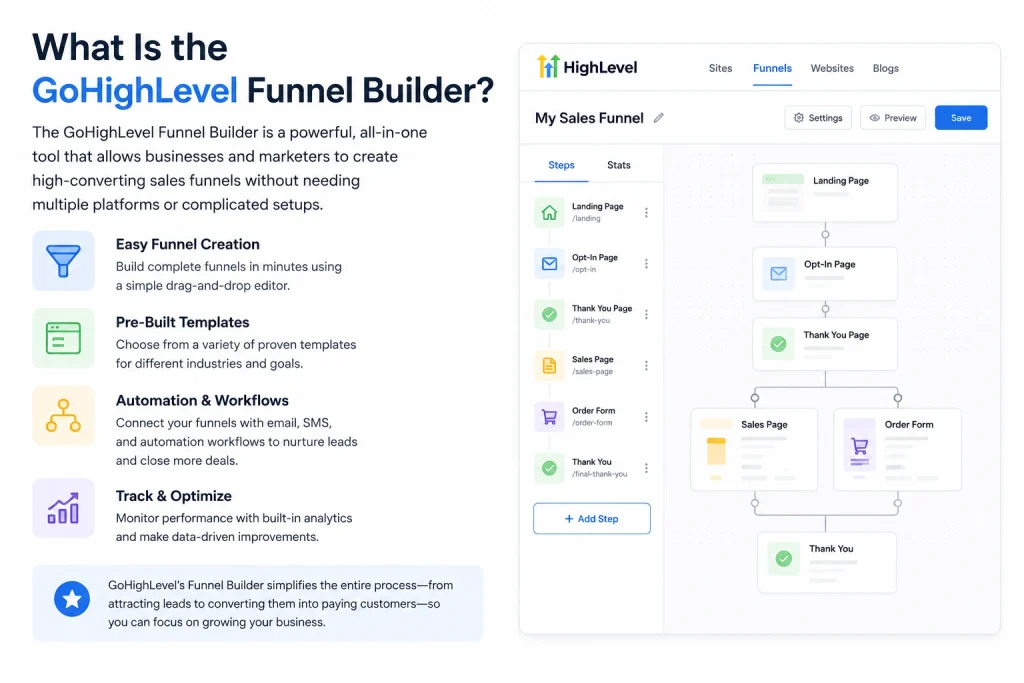
The GoHighLevel funnel builder is a visual, drag-and-drop page editor built into the GoHighLevel platform. It works like the funnel tools inside ClickFunnels or Systeme.io, so switching to GoHighLevel usually feels familiar if you’ve used either one. The difference is what sits underneath it.
So what does that mean for you? A GoHighLevel funnel isn’t just pages. Every page, form, and button click connects natively to the CRM, automation workflows, SMS sequences, calendar, and payment processor — no extra tools bolted on.
A funnel is a direct competitor to ClickFunnels in this sense: it pairs a drag-and-drop page builder with payment processing, pre-built templates, and deep CRM integration in one platform. That’s the whole appeal for agencies juggling multiple client accounts.
400+
Customizable funnel templates
0
Extra tools you need to connect it
3.1%
Average funnel conversion rate industry-wide
How Do You Build a Funnel in GoHighLevel? (Step-by-Step)
Building a funnel in GoHighLevel comes down to five steps: create the funnel, pick a starting point, add your steps, design each page, and connect the automation. Here’s how each one actually plays out.
🔢 Step-by-Step: Your First GoHighLevel Funnel
-
1
Create the funnel
Go to Sites, click Funnels, then Create New Funnel and give it a descriptive name.
-
2
Pick a template or blank canvas
Templates give you a proven design so you can focus on fine-tuning instead of starting from scratch.
-
3
Add your funnel steps
Click Add New Step for each page, then give it a name and a path, which becomes part of the page’s URL.
-
4
Design each page
Pages are built from sections, rows, columns, and elements, created in that order, using drag-and-drop.
-
✓
Connect the domain and publish
Point your DNS to GoHighLevel’s servers, assign the domain to your funnel, then test a form submission before you announce it.
You might be thinking: do I really need five separate pages for a simple offer? Not always. A lead capture funnel can run on just two: a landing page and a thank-you page.
What Types of Funnels Can You Build?
GoHighLevel doesn’t lock you into one funnel shape. The right type depends entirely on what action you want the visitor to take next.
The table below breaks down the most common funnel types agencies build and what each one is for.
Start with one funnel type. Adding a second before the first is converting well just splits your attention.
How Do You Add Forms to a GoHighLevel Funnel?
Forms are what turn a nice-looking page into an actual lead source. Without one, a funnel is just a website.
Inside the builder, open the Form Builder either through the Form Picker in the Funnel Editor or directly, click Add Form, then customize the fields and branding in the Form Editor. Here’s why that matters: the pop-up Form Builder lets you make all these changes inside the funnel workspace itself, so you never have to leave the page you’re editing.
✅ Tip
Keep the first form to 2-3 fields. Name, email, and phone is plenty for a lead capture page — you can gather more later through the CRM.
So what happens after someone submits? Submit a test form yourself, verify the contact appears in your CRM, then confirm the automation actually fires before you go live. Skipping that check is how funnels quietly stop converting for days without anyone noticing.
How Does GoHighLevel Compare to ClickFunnels?
This is the question almost every new user asks. The short answer: GoHighLevel wins on integration, ClickFunnels has a longer track record on pure page design.
| Feature | ClickFunnels | GoHighLevel ✓ Best for agencies |
|---|---|---|
| Built-in CRM | Limited | ✓ Full CRM included |
| SMS & calendar tools | Needs add-ons | ✓ Native, no add-ons |
| Multi-client management | One account per client | ✓ Sub-accounts per client |
Most agencies end up paying for two or three separate tools to replicate what GoHighLevel’s funnel builder does on its own — a funnel tool, a landing page tool, and a separate calendar app. That’s the real cost comparison, not just the monthly subscription price.
What Most People Get Wrong About the GoHighLevel Funnel Builder
⚠️ Warning
A funnel and a website are not the same thing. A website says “here’s everything about us, look around,” while a funnel removes distractions and points visitors toward one single action. Treating them the same kills conversions.
Three beliefs trip up almost every new GoHighLevel user:
“More pages means more professional.” Not true. Most GoHighLevel funnels don’t fail because of bad design software — they fail because of bad structure, not a lack of pages. A tight two-page funnel with a clear CTA beats a bloated seven-page one.
“The AI Funnel builder replaces strategy.” It doesn’t. Funnel AI can build a complete landing page with copy and layout in minutes, but it still needs you to tell it your industry and goal first. The strategy is still yours to define.
“Templates and standalone pages are automatically funnels.” They’re not. Funnels and standalone landing pages are built in the same visual editor, which is exactly why so many people build one page and mistakenly call it a funnel.
Conclusion
The GoHighLevel funnel builder gives you the pages, the CRM, and the automation in one place — no duct-taped tools required. The design part is genuinely easy. The part that actually determines whether leads convert is the follow-up automation behind it.
One thing to do right now: open your GoHighLevel dashboard, go to Sites → Funnels, and check whether your last funnel’s automation is actually connected and firing.
Frequently Asked Questions
How do I access the GoHighLevel funnel builder?
Log in to your GHL dashboard, click the Sites section, then click Funnel Builder to start setting up your funnel pages. It sits inside your sub-account, not the main agency dashboard.
Do I need coding skills to build a funnel?
No. You don’t need a background in coding or web design to build professional, high-converting pages with the funnel builder. Everything is drag-and-drop.
Can I use GoHighLevel’s AI to build a funnel for me?
Yes. Funnel AI lets you type what you want to build, describe your industry and goal, and it generates complete landing pages with copy, layout, and images in about five minutes. It’s optional, not required.
What’s the difference between a funnel and a website in GoHighLevel?
A website lets visitors browse freely across many pages. A funnel is a series of connected pages designed to guide a visitor toward one specific action, like submitting contact info or booking a call.
How do I connect my own domain to a GoHighLevel funnel?
Go to Settings, then Domains, then Add Domain. Point your DNS to GoHighLevel’s servers, then assign that domain to your funnel before publishing.
What automations should follow a lead capture funnel?
Set up email or SMS follow-ups for anyone who opts in, tag and segment leads based on their actions, and add appointment reminders if booking is the goal. This keeps leads warm automatically.
Can I A/B test funnel pages in GoHighLevel?
Yes, you can test different headlines, CTA buttons, images, and copy, then iterate based on the results — small changes can meaningfully lift conversions.
Official reference: HighLevel Support Portal — Launch a Funnel. Conversion benchmark data: VWO — Funnel Conversion Rate Benchmarks.
Want to see the CRM side of this in more depth? Check out our guide to the GoHighLevel CRM, or compare plans on the GoHighLevel pricing page before you commit. If you want to automate what happens after someone fills out your funnel form, our GoHighLevel automation guide walks through the workflow builder step by step. New to the platform entirely? Start with What Is GoHighLevel.
