
ThriveCart Features Explained: Full 2026 Breakdown
⚡ Quick Answer
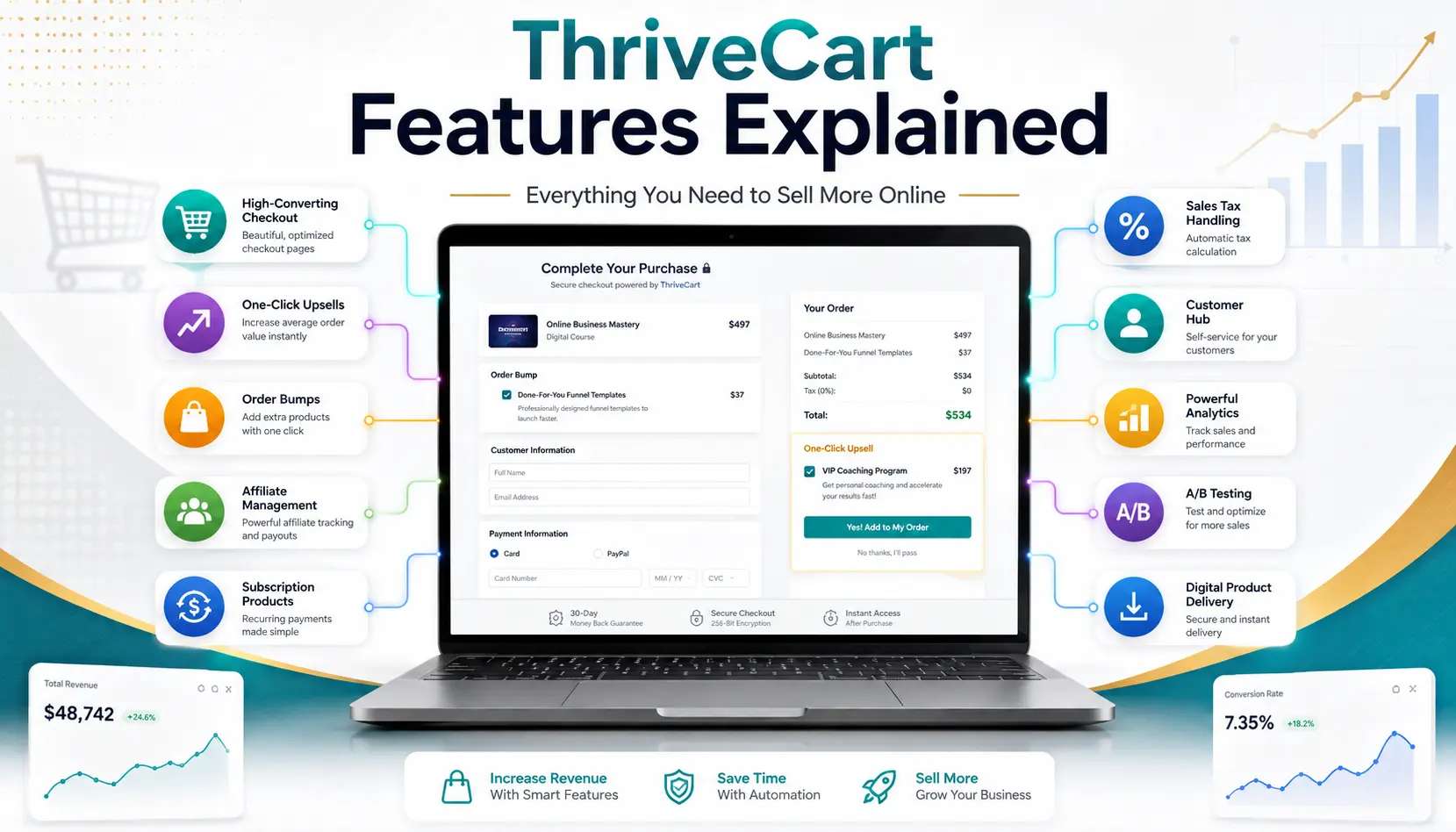
ThriveCart is a one-time-payment checkout and sales platform built for course creators and digital sellers. It handles checkout pages, order bumps, upsells, subscription billing, affiliate management, and a basic course platform (Learn), and in 2026 it’s expanding into landing pages, email marketing, and AI tools through several acquisitions.
Core feature groups
- Checkout: Customizable, embeddable pages that accept 100+ countries and multiple currencies.
- Revenue tools: Order bumps, 1-click upsells and downsells, A/B testing, cart recovery.
- Growth: Built-in affiliate management, subscription billing, and a student LMS called Learn.
You’re staring at three different checkout tools, four pricing tabs, and a Slack channel full of opinions about which one to buy. Picking checkout software for a course or digital product business shouldn’t feel this complicated, but it usually does. I’m Ashraful, and after digging through ThriveCart’s current feature set for this guide, here’s what it actually does — and where it earns its reputation among course creators and online sellers.
ThriveCart started as a checkout page builder and has grown into a much bigger sales platform. Below, you’ll find every major feature group broken down in plain language, so you can decide if it fits your business before you spend anything.
📌 Key Takeaways
-
→
ThriveCart’s checkout supports over 100 countries, multiple currencies, and modal, single-page, or embedded formats. -
→
Order bumps and upsells are ThriveCart’s signature feature, with the company citing AOV gains as high as 118% when several are combined. -
→
Pricing is one-time on the Standard plan, while Pro+ (recommended tier) is one-time upfront, then $295/year starting in year two. -
→
Affiliate management is native to the platform and, per ThriveCart, powers over 900,000 affiliates across its customer base.
What Is ThriveCart, and Who Is It For?

ThriveCart is a hosted checkout and sales platform. Instead of stitching together a separate cart, payment processor, and course host, you build one checkout page and everything connects to it: payments, order bumps, subscriptions, affiliates, and course delivery.
It’s built for people selling something directly online. Think course creators, coaches, software makers, and anyone selling ebooks, templates, or memberships. It’s not a general storefront builder like Shopify — there’s no product catalog browsing experience. It’s a conversion tool for a single offer or funnel at a time.
So what does that mean day to day? You send traffic straight to a ThriveCart checkout link from an ad, email, or landing page, and the platform handles the sale from click to delivery.
How Does ThriveCart’s Checkout Actually Work?
ThriveCart’s checkout is the foundation everything else sits on. You build a page with its editor, choose a format, and connect a payment processor — no separate merchant account juggling required.
Here’s a look at the checkout formats and payment flexibility ThriveCart offers.
The takeaway: you’re not locked into one processor or one checkout style, which matters if you sell to a global audience.
You might be thinking a hosted checkout means less design control. Here’s why that’s mostly not true: ThriveCart’s page editor lets you match your branding, add trust badges and testimonials, and switch layouts without touching code.
What Revenue-Boosting Tools Does ThriveCart Offer?
This is where ThriveCart built its reputation. The platform is designed to increase the value of each sale, not just process the transaction. That’s the whole idea behind order bumps and upsells sitting right in the checkout flow.
+118%
Cited AOV lift from combining bumps, upsells, and downsells
+71%
Cited AOV lift from 1-click upsells alone
+32%
Cited AOV lift from 1-click downsells
Figures as reported by ThriveCart on its own features page; treat vendor-published lift numbers as directional, not guaranteed.
📋 Revenue Optimization Tools
-
Order bumps: One-click add-ons shown right on the checkout page before the buyer pays. -
1-click upsells and downsells: Post-purchase offers the buyer accepts without re-entering payment info. -
A/B testing: Split-test checkout pages or full funnels to see what actually converts. -
Cart abandonment recovery: Automated follow-up for buyers who start checkout but don’t finish.
So what does this mean for you? If you’re only using a basic checkout link today, adding even one order bump usually pays for the software within your first few sales.
How Does ThriveCart Handle Subscriptions and Recurring Billing?
If you sell memberships or software, subscription handling matters as much as the initial sale. ThriveCart manages the full subscription lifecycle: trials, renewals, failed payments, and cancellations.
Failed Payment and Churn Recovery
When a card fails, ThriveCart runs automated email dunning sequences to recover the payment before the subscription lapses. When a customer tries to cancel, ThriveCart can present a retention offer — a discount, downgrade, or pause option — instead of losing the customer outright.
That’s not all. Plan switching includes prorated billing, so upgrades and downgrades don’t require manual math on your end.
Does ThriveCart Have Built-In Affiliate Management?
Yes, and it’s one of the platform’s stronger differentiators. Most checkout tools require a separate affiliate app. ThriveCart builds affiliate tracking directly into the same system that processes your sales.
📋 Quick Summary
ThriveCart’s affiliate system covers onboarding, tracking links, automated commission payouts, clawbacks, and joint venture contracts for partner deals. According to ThriveCart, its affiliate tools currently support more than 900,000 affiliates across its user base.
Here’s why that matters: launching an affiliate program without leaving your checkout platform removes a whole layer of integration work most sellers put off for months.
Can ThriveCart Host and Sell Online Courses?
Every ThriveCart account includes a basic learning management system called Learn. It handles course hosting, student access, and content delivery without a separate LMS subscription.
- Course and membership content, including recurring access
- Conditional logic and drip-fed lessons
- Bundles that package multiple courses into one program
- Custom domains for consistent branding
- Student progress tracking and CSV migration from other platforms
ThriveCart reports its Learn platform has processed more than 13 million student enrollments across its customer base — a sign this isn’t a bolt-on feature but a genuinely used part of the product.
What Analytics and Integrations Come With ThriveCart?
ThriveCart’s reporting covers revenue dashboards, funnel analytics, UTM-based conversion tracking, subscription analytics, churn insights, lifetime value, and cohort reporting. Pro+ accounts get the deeper funnel and UTM tracking; Standard accounts get the core revenue dashboards.
On the integration side, here’s how the two main plans compare.
| Feature | Standard | Pro+ ✓ Recommended |
|---|---|---|
| Direct integrations | 40+ | ✓ 100+ |
| Order bumps | Not included | ✓ Multiple order bumps |
| Affiliate center | Not included | ✓ Included |
| Custom branding & domains | Not included | ✓ Included |
For most sellers running any kind of funnel with bumps or affiliates, Pro+ is the tier that unlocks the features people actually buy ThriveCart for.
How Much Does ThriveCart Cost?
ThriveCart Standard is a one-time payment. Pro+, the recommended tier that unlocks bumps, affiliates, and advanced subscription tools, is also paid upfront, then carries a $295-per-year fee starting in your second year to keep those advanced features active. Neither plan charges a percentage transaction fee on your sales.
⚠️ Warning
Pricing promotions and lifetime-deal windows change often. Confirm current pricing on ThriveCart’s own pricing page before buying — third-party review sites sometimes list outdated numbers.
What Most People Get Wrong About ThriveCart
Misconception one: that ThriveCart is “just a checkout page.” In practice, the affiliate system, subscription management, and Learn LMS are full features many buyers don’t discover until after they’ve signed up.
Misconception two: that the one-time price means zero ongoing cost forever. The Pro+ tier — the one most sellers actually want — carries a $295/year fee starting in year two, so it’s not entirely a “pay once, done forever” deal.
Misconception three: that ThriveCart works like a full storefront. It doesn’t have a browsable product catalog. It’s built around single-offer funnels, not multi-product shopping.
Where Is ThriveCart Headed in 2026?
ThriveCart has acquired several companies it’s folding into one ecosystem: an auto-webinar tool (ThriveSeminar), an on-site conversion pop-up tool (ThriveConvert), an email marketing platform (ThriveCampaign), a landing page builder (ThrivePages, formerly Convertri), and an AI design tool (ThriveStudio). The company is also rolling out subscription bumps, multi-currency adaptive pricing, and an AI copilot called ThriveAI later in the year.
Here’s why that matters: if these integrations land well, ThriveCart moves from “checkout tool” toward a full marketing stack — which could reduce how many separate subscriptions a seller needs to run their business.
Frequently Asked Questions
What is ThriveCart used for?
ThriveCart is used to build checkout pages, process payments, add order bumps and upsells, manage subscriptions, run an affiliate program, and host online courses — all from one platform instead of several separate tools.
Does ThriveCart charge transaction fees?
No. ThriveCart charges 0% transaction fees on both the Standard and Pro+ plans. Your payment processor, such as Stripe or PayPal, still charges its own standard processing fees.
Is ThriveCart good for beginners?
Yes, the checkout builder itself is beginner-friendly with no coding needed. The learning curve shows up more in the advanced features, like funnel sequencing and affiliate setup, which take longer to configure well.
Can ThriveCart replace my email marketing tool?
Not fully yet. ThriveCart integrates with major email tools today, and its acquired platform ThriveCampaign is being built into the ecosystem, but as of now it still works best alongside a dedicated email provider.
What payment processors work with ThriveCart?
ThriveCart connects directly with Stripe and PayPal, and also offers its own installment option, ThrivePay, for splitting payments over 3, 6, or 12 months without loans or credit checks.
Does ThriveCart include an LMS for courses?
Yes. Every account includes Learn, ThriveCart’s built-in course and membership platform, with student tracking, drip content, and bundles. A more advanced tier, Learn+, is available as a separate upgrade.
What’s the difference between ThriveCart Standard and Pro+?
Standard covers core checkout, basic reporting, and Learn. Pro+ adds order bumps, the affiliate center, advanced subscription tools, custom branding, and deeper analytics — it’s the tier most active sellers choose.
