
GoHighLevel for Marketing Agencies: Complete Guide 2027
Quick Answer
GoHighLevel helps marketing agencies manage separate client accounts, capture leads, automate follow-ups, build funnels, schedule appointments, and monitor sales activity from one platform. Its biggest operational advantage is connecting these tasks into repeatable client systems. However, agencies still need proper setup, testing, reporting, and oversight to get reliable results.
| Platform: | GoHighLevel |
|---|---|
| Trial types: | 14-day standard, 30-day extended partner trial |
| 30 Days Trial: | Available ($0 trial for 30 days) |
| Price: | $97-$497 |
| Discount: | 20% OFF on all plans (save $994/year) |
| Special Offer: | 30-day free trial |
| Cancel: | Anytime from your billing settings before the trial renews |
| Best for: | Agencies, SaaS resellers, local businesses, coaches |
Running a marketing agency often means managing several disconnected tools. One handles leads, another sends emails, a third builds landing pages, and a spreadsheet tracks what happens afterward.
GoHighLevel brings many of those functions into a connected workspace. The important question is not simply how many tools it replaces, but how an agency can use the platform to deliver consistent client results without creating more administrative work.
This guide explains the practical agency setup, the workflows worth building first, and the operational limitations to consider before moving clients onto the platform.
How Does GoHighLevel Work for Marketing Agencies?
GoHighLevel uses a two-level account structure. The agency manages its overall operation from an agency dashboard, while individual client businesses operate within separate sub-accounts.
At the agency level, administrators can create client accounts, control permissions, manage reusable configurations, and access supported billing or branding features.
Inside a client sub-account, the team can work with contacts, pipelines, conversations, calendars, funnels, and automations associated with that business.
For example, an agency serving a dental practice and a roofing company can maintain separate lead pipelines, booking calendars, customer communications, and marketing assets for each client.
This separation matters because client processes should not accidentally share contacts, messages, or campaign configurations. For a deeper explanation, see our comparison of agency accounts and sub-accounts.
Which GoHighLevel Features Matter Most to Agencies?
The most valuable features are those that connect lead acquisition with follow-up, sales activity, and measurable client outcomes.
CRM and Sales Pipelines
The CRM stores contact information, interactions, and opportunities. Custom pipelines let agencies organize the stages a prospect moves through before becoming a customer.
A home-services client might use New Inquiry, Contacted, Estimate Booked, Quote Sent, and Won. These stages give the agency a shared view of lead progression.
A pipeline only becomes useful when its stages have clear definitions and someone is responsible for keeping opportunities updated.
Funnels, Forms, and Booking Calendars
Agencies can create landing pages that collect inquiries and connect form submissions to CRM records and automated workflows.
Calendars add another step by letting qualified prospects book appointments. A confirmation or reminder workflow can then support the booking process.
For a detailed walkthrough of page creation, our GoHighLevel funnel builder guide explains the practical construction process.
Marketing Automation
Workflows use triggers and actions to handle recurring tasks. A form submission might create an opportunity, notify a salesperson, and start an appropriate follow-up sequence.
Other useful workflows include appointment reminders, missed-call follow-up, internal notifications, and post-service review requests.
The objective is to automate predictable work while preserving human involvement when a lead needs a personalized response.
Conversations and Reputation Management
Supported communication channels can be managed through the platform’s conversation tools, reducing the need to check several separate interfaces.
Agencies can also help service businesses request and manage customer reviews. These processes should reflect genuine customer experiences and follow applicable platform policies.
How Do You Set Up GoHighLevel for an Agency?
Start with one complete client workflow rather than configuring every available feature. This makes it easier to identify problems before repeating the setup across multiple businesses.
- Configure the agency account. Complete business information, administrative access, account security, and relevant billing settings.
- Create a client sub-account. Choose the correct business details, location, time zone, and users.
- Configure communication services. Connect the required email and telephone services, verify sender information, and complete any applicable registration or compliance steps.
- Build a sales pipeline. Define meaningful stages that reflect the client’s actual sales process.
- Create a lead capture path. Connect a landing page or form to the appropriate contacts and opportunities.
- Set up a booking calendar. Check availability, assignment rules, and confirmation settings.
- Build a basic workflow. Start with acknowledgment, team notification, and a clearly defined follow-up process.
- Test the full journey. Submit a test inquiry, inspect the CRM, verify message delivery, and check appointment behavior.
Only after these steps work together should the agency expand into more advanced campaigns or additional client accounts.
Tip
Create a standard onboarding checklist covering domains, calendars, messaging permissions, integrations, workflows, reporting, and client access. Use it every time a new account goes live.
Which Automations Should Marketing Agencies Build First?
Begin with workflows that solve visible operational problems. A complicated automation is not automatically more valuable than a reliable, simple one.
The following examples show how different workflows support common agency services.
| Workflow | Trigger | Purpose |
|---|---|---|
| New lead response | Form submission | Acknowledge inquiry and notify staff |
| Appointment reminder | Booking created | Reduce forgotten appointments |
| Sales follow-up | Opportunity stage change | Prompt the next sales action |
| Review request | Service completion | Invite genuine customer feedback |
For the first workflow, a useful test is whether a prospect can submit a form, appear in the correct pipeline, receive an appropriate acknowledgment, and reach the responsible employee without intervention.
Next, test failure conditions. What happens if the contact has already replied? What if the lead books an appointment before the next reminder? What if contact information is missing?
HighLevel provides workflow settings such as Stop on Response to help prevent unwanted follow-up after an interaction. The official workflow settings documentation explains these controls.
Automation should also respect consent, opt-outs, sending restrictions, and applicable messaging laws. An active workflow does not establish that a message is legally permitted.
How Can Agencies Reuse Setups Across Clients?
Snapshots let agencies reuse selected account configurations instead of rebuilding similar systems for every client.
A snapshot can include assets such as funnels, workflows, forms, calendars, and custom fields. Agencies typically configure a source sub-account, create a snapshot from it, and load that configuration into another account.
Suppose an agency serves several dental practices. It could prepare a reusable appointment-request funnel, lead pipeline, confirmation sequence, and standard reporting structure.
Each new client would still need its own business information, domain connections, calendar availability, sender configuration, and final testing.
Importantly, snapshots are not full backups. HighLevel states that contacts, appointments, conversations, reputation data, and certain integrations are not included in standard snapshots.
See HighLevel’s snapshot creation documentation for the supported assets and current process.
Warning
Never activate an imported workflow without checking its recipients, timing, sender details, links, and conditions. A reusable template can still contain settings that are inappropriate for another client.
How Should Agencies Measure Client Results?
Useful reporting starts with the client’s business objective, not the number of features enabled.
For a lead-generation client, monitor the number of captured leads, valid inquiries, booked appointments, attended appointments, qualified opportunities, and closed sales.
An agency should also compare the records with advertising-platform data when relevant. CRM attribution and advertising reports can use different methods, so their numbers may not match exactly.
Agree on definitions before presenting results. For example, distinguish a submitted form from a qualified lead, and distinguish an appointment booked from an appointment attended.
When revenue attribution is incomplete, describe the limitation rather than presenting estimated sales as verified revenue.
A practical reporting rhythm is to review operational issues frequently, discuss campaign performance with clients regularly, and document changes that affect comparisons across periods.
What Does GoHighLevel Cost an Agency?
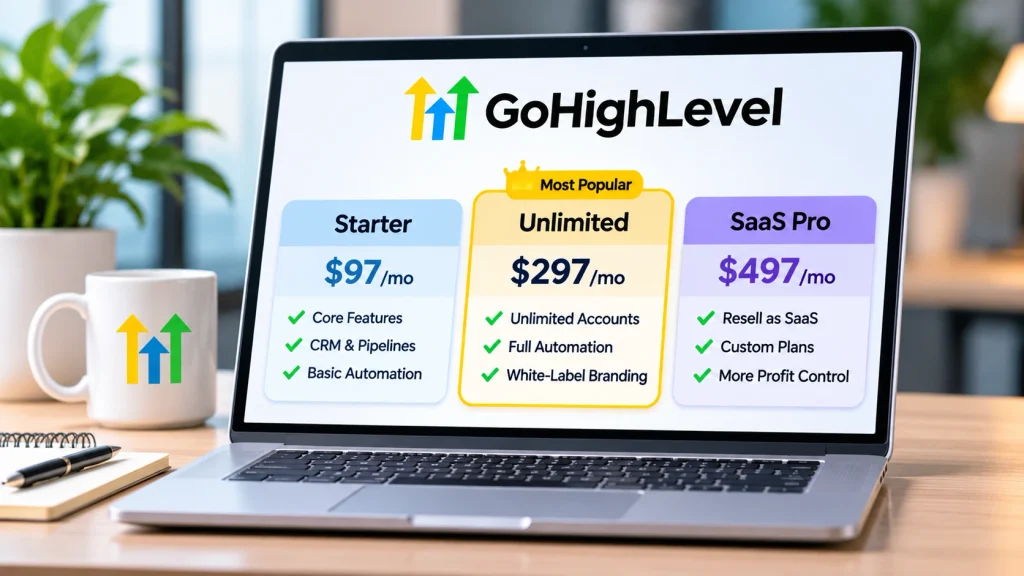
HighLevel’s publicly advertised monthly subscription tiers are $97 for Starter, $297 for Unlimited, and $497 for its highest agency tier.
Starter supports up to three sub-accounts. Unlimited supports an unlimited number of sub-accounts, while the higher tier adds advanced SaaS-related capabilities.
These subscriptions do not mean that every communication, AI feature, add-on, or external service is free. Usage-based charges can apply, so evaluate the full cost of operating each client account.
For a detailed plan comparison, see our GoHighLevel plans and pricing guide, and verify current subscription terms on the official pricing page.
The right plan depends on the number of client accounts and whether the agency needs additional monetization features, not simply which subscription contains the most options.
Can Marketing Agencies White-Label GoHighLevel?
Yes. HighLevel offers agency branding and white-label capabilities, with specific options depending on the subscription and feature configuration.
White-labeling can help agencies present a more consistent client experience. SaaS Mode can support the sale of software subscriptions and automated client-account provisioning on eligible plans.
However, branding the platform does not eliminate support, training, or account-management responsibilities. Agencies must decide who handles client questions, billing disputes, onboarding, and technical issues.
For service-focused agencies, it may be more sensible to establish a reliable managed service before introducing a separately priced software subscription.
What Are the Main Limitations Agencies Should Consider?
GoHighLevel covers many common marketing processes, but implementing several functions inside one platform introduces operational dependencies.
- Learning curve: Teams need training in accounts, pipelines, workflows, permissions, and reporting.
- Configuration effort: Email delivery, messaging, calendars, domains, and external integrations may require separate setup.
- Usage costs: Subscription fees are not necessarily the full monthly expense.
- Reporting differences: Attribution may differ between the CRM, advertising platforms, and actual sales records.
- Automation mistakes: Incorrect conditions can cause duplicated messages, missed follow-ups, or poor client experiences.
- Specialized requirements: Agencies may still need dedicated tools for advanced analytics, accounting, or other services.
Before migrating an established client, audit the existing tools and data. Identify what can move, what must remain connected, and what needs to be rebuilt.
Is GoHighLevel a Good Fit for Your Marketing Agency?
GoHighLevel is particularly relevant to agencies providing repeatable lead-generation, appointment-setting, CRM management, and follow-up services to multiple clients.
It may offer less immediate value to an agency focused entirely on creative production or specialized analytics, especially when CRM and client communication are outside its responsibilities.
Before adopting it broadly, choose one representative client process and evaluate whether the team can deliver and maintain that process more reliably.
Check the total operating costs, staff training requirements, client access needs, reporting expectations, and exit or data-export considerations.
The platform should support the agency’s service model rather than dictate it.
Frequently Asked Questions
Can an agency manage multiple clients in GoHighLevel?
Yes. Agencies manage separate client sub-accounts, with the number supported by their subscription plan. This structure helps organize client-specific contacts, marketing assets, and operations.
Does GoHighLevel replace every agency marketing tool?
No. It can consolidate many CRM, marketing, funnel, and scheduling tasks, but specialized software and integrations may still be necessary.
Can agencies give clients access to their accounts?
Yes. Agencies can assign users to relevant sub-accounts and manage access according to supported roles and permissions.
Do agencies need coding skills to use GoHighLevel?
Most standard funnel, CRM, and workflow tasks can be configured without writing code. More complex integrations, custom functionality, and troubleshooting may require technical expertise.
Final Thoughts
GoHighLevel for marketing agencies works best as a connected client-management and marketing system, not merely a collection of software features.
Build one dependable lead-to-appointment process, verify its results, document the configuration, and then reuse what works. That approach gives agencies a practical foundation for managing additional clients without unnecessarily multiplying complexity.
